Showing posts with label Social Media. Show all posts

2026/06/10

How to Advertise on LinkedIn: Everything You Need to Know (Complete Guide)

Do you want to run ad campaigns on the social network for a high conversion rate? Or Are you looking for the best system that will help you get better results? You may have used Facebook ad tests or Twitter ads, but have you ever advertised on LinkedIn?

When it comes to advertising on LinkedIn, most of the people have never even tried it. The big reason is that advertising on Facebook and Twitter was much more comfortable than advertising on LinkedIn.

But, here comes the change.
How to Advertise on LinkedIn: Everything You Need to Know (Complete Guide): eAskme
Other people are reading: Best Linkedin Alternatives

Now, LinkedIn has a recreated ad serving system and made it an easy to use social media network.
LinkedIn is the best choice to target the B2B audience.

The presence of B2B networks on LinkedIn has made it the most popular professional social network.

LinkedIn has recently refined targeting options. Now it is helping marketers to target the specific set of professionals effectively.
  • Want to reach marketing firms? You can target those using LinkedIn Ads.
  • Want to focus on the education industry? You can reach them using LinkedIn Ads.
  • Want to find interns? You can connect with LinkedIn ads.
This year B2B option is attracting businesses and marketers to use LinkedIn.

This doesn’t mean that businesses are not advertising on Facebook or Twitter, but they will focus more on LinkedIn this year.

Notable: There is one thing you should know about the LinkedIn ad network is that the ad cost will be higher than Facebook ads.

You must have the right amount of money to play with LinkedIn ads.

If cash is not the problem and you are ready to run LinkedIn ads, then you should learn some basic rules.

LinkedIn Advertising Options:

LinkedIn was extremely limited to advertisers. There was no room for advertisers to achieve their goals. But, things have changed in 2021. LinkedIn will keep upgrading its ad system to add more freedom and room for advertisers.

Now LinkedIn Ads allow you to create ads based on your target.

When advertising on a social network like LinkedIn, you must have clear goals.

To successfully advertise on LinkedIn you need to have one of the following goals:
  • Brand Awareness
  • Engagement
  • Job Applicants
  • Lead Generation
  • Video views
  • Website visits
  • Website conversions
Now it is the time to uncover the most used objectives with LinkedIn advertising;
  • Job Applications
  • Lead generation
  • Website visits and Video Views.
Organic engagement is also a way to reach out to the LinkedIn Audience

LinkedIn ads will cost you more money than Facebook ads. I suggest you first to choose your target and then plan your ad.

Be blunt when it comes to choosing ad objectives on LinkedIn.

No matter what objective you have, you will have five types of ads on LinkedIn:

LinkedIn ad types:

Sponsored Content ads:

Sponsored content ads work similar to sponsored content. In the sponsored content ad you will be promoting a post or page in the LinkedIn feed.

LinkedIn Sponsored content ads have the highest CPC. It is always wise that you only promote pages with a call to action.

Text Ads:

LinkedIn text ads work directly as other text ads. You can find them on the right side of the LinkedIn feed. One can also see these ads below “People You May Know” section. These ads can play a useful role in conversion.

You may need to do some tests to find which work best for you.

Sponsored InMail:

LinkedIn sponsored InMail ads will display like spam email in the inbox. But as these are under LinkedIn policies so you can boost the higher conversion with these ads.

As these ads fall in the inbox directly from the business page or personal profile, the chances are that people find them more exciting and like to communicate with the business.

Note:
Make sure that you do not copy/paste the InMail ads.

LinkedIn Video Ads:

As the name suggests, LinkedIn video ads will allow you to promote your videos to the target audience. Video marketing will be one of the most critical parts of the marketing strategy this year.
You may need to run tests to find which video ad works best for you.

LinkedIn Dynamic Ads:

The focus of LinkedIn Dynamic ads is to engage prospects with personalized ads. With the help of dynamic ads, you can personalize the experience according to your audience.

You can use this type of ads to capture the attention of professionals. Ads will display their own professional's photo, data, company name, and title.

You can also customize the dynamic ads according to your objectives.

The main reason brands use LinkedIn dynamic ads is that it allows you to boost the audience and followers for your profile or business page.

LinkedIn Carousel Ads/Native Ads:

Carousel ads or native ads are there to attract professionals by telling them an interactive story.

Linkedin Carousel ads are helpful for those who want to share their brand story. You can use this type of ads to capture the attention of the target audience.


You may want to know about the specs and ad dimensions. Here is everything you should know about each LinkedIn ad type and objectives when creating ads on LinkedIn;

LinkedIn Audience Targeting

Time to talk business now.
  • Who is your target audience? (Male/female, age/location)
  • Are they working in the same industry?
  • Are they upper management or lower management?
  • Do they have experience of each job between 2-4 years?
  • Do they are in connection with a similar brand or professional?
You must know the answer to these questions.

LinkedIn is giving invaluable targeting options, but you can only get the results if you understand the demographics of your audience.

You can target coffee table people on Facebook, but on LinkedIn, your target should be what they have worked, what they have studied and which option you want to focus.

Remember: You can target more than just Founders and CEO with LinkedIn. You can target grown not only people but also target the startups and your entrepreneurs.

You can also target;

  • People looking for jobs
  • Freshers or experienced
  • Graduated or undergrads etc. using LinkedIn Ads.
Every minute 120+ members join LinkedIn.

How to Track LinkedIn Ad Conversion:

Only you need to know how much success you LinkedIn ad campaigns are getting.

LinkedIn ads offer various metrics that you can use to track the failures and success of ads.

I am sharing a few of the must-have conversion tracking techniques that you must use.

Event Specific Pixel:

If your goal is lead generation, then you should use event-specific pixel to track results.

You can attach. Thank you page with your form. Also, add tracking codes.

You must add conversion tracking to your LinkedIn campaigns.

Site-Wide Insight Tag:

Site-Wide Insight Tag is helpful to track the actions on your website.

It works similar to the Facebook pixel. You need to add this code on your site, and it will start tracking the behavior using LinkedIn ads.

Tip: You can also use LinkedIn re-targeting ads.

How to Use LinkedIn’s Content Suggestion:

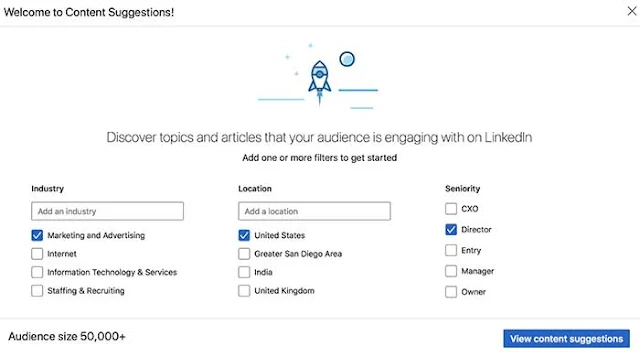
Linkedin content suggestions will help business pages to discover what they should write about. You can use trending topics, title, and descriptions.

Content targeting helps you target the CEO and directors of your competition.
How to Advertise on LinkedIn: Everything You Need to Know (Complete Guide): eAskme


All you need is to choose the seniority, industry, and location. LinkedIn will display trending topics according to your filters.

This will help you use the trending headlines with creative ideas.

Final Words:

LinkedIn is one of the great options to target the B2B audience.

B2B marketers are using various techniques when using LinkedIn Ads. It is exciting to see how LinkedIn is helping marketers achieve their goals and what new features LinkedIn will add.

LinkedIn is ready to give more freedom to marketers to increase conversion and success.

You have questions? Share via comments.

Find this post helpful, don’t forget to share it!

Handpicked Social Guides to Boost Conversion;
If you find this article interesting, don’t forget to share it on Facebook, Twitter or Google Plus with your friends and family.

Don't forget to like us FB and join the eAskme newsletter to stay tuned with us.
Read More

2026/06/08

Sotwe Review: 15 Alternatives with Infographic

Sotwe is a popular platform for X (Twitter) research and analysis. Marketers who want to follow popular hashtags, accounts or keywords on Twitter are using platforms like Sotwe. It is a no-login platform to track content performance. 

It keeps the user anonymous while browsing the popular trends on X (Twitter).

While the platform is popular among Twitter users and active before Elon Musk took over Twitter and renamed it.

Most of the internet and social media users are not aware of what Sotwe is.

And how does it work?

Even the users who are using Sotwe services are complaining about the regular downtime. This is where the marketers look for Sotwe alternatives to track trends on X.

Sotwe Review: Is It Safe, Pro, Cons and 15 Alternatives: eAskme

Other people are reading: Snaptroid: Is it Real? How does it work?

Today, I am sharing everything that you must know before using Sotwe.

Sotwe:

What is Sotwe? This question comes to the mind of every person who hears about this tool for the first time.

Sotwe is an online tool and web application that allows users to track X posts and profiles without a subscription. The subscription-free model is the reason behind Sotwe’s popularity.

Sotwe registered on October 19, 2020. In the last 6 years, the platform has grown from nothing to one of the most popular tools to track social media mentions on X.

It tracks posts, profiles, and mentions on X (Twitter). For many years, it has used the Twitter API for many years. But after rebranding, X has depreciated the API that gave third-party apps access to Twitter content.

X (Twitter) blocked access to its API, which resulted in shutting down the websites depending on the Twitter API.

The new restrictions for X (Twitter) made tracking difficult. Yet, somehow, Sotwe is still able to track hashtags and keywords on X.

Sotwe became the home of the users who lost their social media profiles and still want to access X (Twitter) content.

It is a no-nonsense platform to access X posts, brand mentions, and profiles.

Is Sotwe Safe?

Sotwe is not working in broad daylight. It operates in the grey area of the internet.

Without the X API, Sotwe is still tracking X posts, media, and profiles. Even though it is harmful, the use depends upon the user’s intent.

But here is something that you must know.

X depreciates the API that gives third-party apps access to its content. Yet Sotwe is able to bypass API loopholes and provides access to Twitter content. It seems that Sotwe is using IP data.

Due to a lack of support, the Sotwe platform shuts down multiple times. The high downtime and lack of support make users question whether Sotwe is safe or not.

Many platforms and regions have limited access to anonymous Twitter viewing websites like Sotwe. Using VPNs can still expose you to potential risks.

Why Sotwe is Popular:

Sotwe is popular because it offers anonymous X (Twitter) viewing.

Here are the reasons that make Sotwe popular:

  • Anonymous X (Twitter) content browsing
  • No login
  • No subscription
  • Easy-to-use
  • Fast loading
  • Track hashtags and brand mentions
  • No ads
  • No Installation
  • Easy navigation
  • Access trends, posts, and profiles.
  • Mobile-responsive

Sotwe.com is very specific about how it works. It only unlocks the content shared in recent times. Users have limited access to X (Twitter) content.

Sotwe Pros and Cons:

Sotwe is popular among users who want anonymous X (Twitter) access. But for more engaging users, it lacks everything.

Here are the pros and cons of Sotwe:

Pros:

  • Anonymous browsing
  • No login or registration
  • Easy access to hashtags and profiles.
  • Global accessibility
  • Track trends and brand mentions

Cons:

  • No support from X API.
  • High downtime
  • Lack of anonymity
  • Limited content
  • Unofficial platform

Who Should Use Sotwe:

Researchers, social media marketers, bloggers, and trend followers can use Sotwe.
  • Marketers: Use Sotwe to track popular trends and competitor social media profiles.
  • Researchers: Track stories, resources, updates, and related information.
  • OSINT Analysts: It is easy to track public reactions to popular trends.
  • Bloggers: track popular hashtags to choose topics to write.

Sotwe Alternatives:

Even though Sotwe is popular, it faces downtime and has limitations. This is where users choose Sotwe alternatives.

Nitter:

Nitter is one of the most popular Sotwe alternatives. It offers anonymous X (Twitter) viewing. It is a responsive and easy-to-use platform.

You do not need a subscription, registration or login to access Nitter. It offers anonymous browsing for free.

Pros:

  • Free platform
  • No signup
  • No subscription
  • Open source
  • User-friendly
  • Zero tracking

Cons:

  • High downtime
  • Lack of advanced features

Twstalker:

Twstalker is another Sotwe alternative. It offers a clean user interface to view X (Twitter) profiles, posts, and hashtags without login.

You can check posts, followers, and social media accounts anonymously. It is an easy-to-use platform for social media marketers and journalists.

Pros:
  • Easy-to-use dashboard
  • No registration
  • Anonymous X (Twitter) browsing

Cons:

  • Ads
  • No advanced features

SkyGram:

SkyGram is another popular anonymous social media browsing alternative to Sotwe. It is accessible worldwide. It offers digital access to X (Twitter) content.

All you need is to type a keyword or a hashtag in the search, and it will unlock the content. It is a fast-loading platform without pop-ups.

Pros:

  • Zero cost
  • No signup
  • Quick browsing
  • Anonymous

Cons:

  • Downtime
  • Lack of advanced filters

TwitStat:

As the name suggests, TwitStat was developed to read content stats shared on Twitter. But due to API changes, the platform limited its capabilities.

Now, you can use TwitStat to read social media posts, brand mentions, patterns, and social engagement count.

You can use this data to plan your own X (Twitter) content marketing strategies.

Pros:

  • Analytics and reporting
  • Track followers and mentions
  • Zero cost

Cons:

  • Downtime
  • Slow
  • Browsing experience lacks

Twuko:

Twuko is an easy-to-use social media analyzer for X (Twitter). As a Sotwe alternative, it offers similar features such as X posts, profiles, hashtags, and mentions.

It is an easy-to-use platform with a clean design and easy navigation. It is popular among marketers and OSINT.

Pros:

  • Easy research
  • Smartphone compatible
  • Clean user interface

Cons:

  • No advanced filter
  • No deep insights
  • Downtime

Tweeload:

Tweeload is another popular platform to browse Twitter content anonymously. It offers similar features to Sotwe. You can use Tweeload to download X posts, profiles, and media. It is a responsive and fast-loading platform.

Pros:

  • Download videos
  • No subscription
  • No login
  • Easy-to-use

Cons:

  • High downtime
  • Limited features
  • No advanced filters

PopTop:

PopTop is a popular platform and an alternative to Sotwe. It unlocks free access to brand mentions, posts, hashtags, and media on X (Twitter). You can use it to track the performance of popular posts and engagement.

Pros:

  • Track trends
  • No login
  • No subscription
  • Clean and optimized website

Cons:

  • Lacks analytics
  • No customer support
  • No advanced features

xBrowser:

xBrowser also provides anonymous access to Twitter content. It only requires a hashtag or a username to track the content. You can use xBrowser to read posts, download videos, and check engagement.

Pros:

  • Easy-to-use
  • No login
  • Responsive

Cons:

  • Downtime
  • Lack of advanced filters

TwitterViewer:

TwitterViewer works as an anonymous X viewer. It is the social media alternative to Sotwe to unlock anonymous access.

You can use it to read Twitter threads, tweets, and check user engagement. It is useful for OSINT, publishers, and marketers.

Pros:

  • Clean dashboard
  • Easy navigation
  • No subscription

Cons:

  • Old design
  • Lack of modern tracking
  • Downtime

TwitFix:

TwitFix allows users to access X (Twitter) profiles using a hashtag or a URL. It also opens access to tweets and media content. You can view Twitter videos and download them using third-party tools.

Pros:

  • Download media
  • Free platform
  • No subscription

Cons:

  • No best for browsing
  • Downtime
  • Lacks advanced filters

Pingr:

Pingr is an anonymous X (Twitter) viewer like Sotwe. It is an easy-to-use tool with a clean design and global accessibility.

You only need a URL or keyword to access Twitter content using Pingr.

Pros:

  • Quick access
  • Clea interface
  • Fast loading
  • No login

Cons:

  • Downtime
  • No social media filters

FxTwitter:

FxTwitter became popular with the rise of X (Twitter). It gives users the ability to access X content without a login or a social media account. You can use FxTwitter to view posts, read comments, and track user engagement.

Pros:

  • Easy-to-use
  • Clean design
  • Fast loading
  • Responsive design

Cons:

  • Not for downloading
  • Lacks best features
  • Downtime

ProxiTok:

ProxiTok is a secure alternative to Sotwe. You can use it for anonymous X (Twitter) browsing. It is a tool with a massive user base. It allows you to view comments, analyze engagement, and view videos.

Pros:

  • Privacy
  • Open-source platform
  • Easy to use and fast loading

Cons:

  • Limited features
  • Donwtime

Invidious:

Invidious is another popular platform to browse Twitter content anonymously. As a Sotwe alternative, it offers similar features and benefits. You can use Invidious to view comments, read threads, and track trends.

Pros:

  • Global accessibility
  • No Ads
  • No tracking
  • Community-driven platform
  • Privacy first

Cons:

  • Limited features
  • No filters
  • Occasional downtime

TweetFeast:

TweetFeast is another popular Sotwe alternative to access Twitter content anonymously. It allows users to access posts, videos, comments, and social shares without login or subscriptions.

Pros:

  • No login
  • No subscription
  • Global access
  • Support digital devices

Cons:

  • Downtime
  • Limited features
  • Lacks search option

Sotwe Alternatives Infographic:

Sotwe alternatives Infographic: eAskme

How to Use Sotwe Responsibly?

Sotwe is an anonymous browsing platform that operates in the gray area. It uses third-party tools to access X (Twitter) content for users without logging in. 

Here is how you can be safe while browsing Sotwe:

  • Use a secure network
  • Do not open personal links
  • Clear cookies
  • Do not install ads or pop-ups

Future of Sotwe:

Sotwe is facing a hard time since X (Twitter) depreciated its API for third-party websites. It is now using limited tools and features to unlock content anonymously.

Users who want to get a better experience should always log in and access content through X.com.

Conclusion:

Sotwe is a popular anonymous Twitter browsing platform. It gives users access to X (Twitter) posts, comments, threads, and engagement metrics.

Marketers can use this information to plan their X marketing campaigns.

To be safe, it is best to use the official X platform.

FAQs:

What is Sotwe?

It is a login-free platform to access X social media content online.

Is Sotwe Safe?

Sotwe's website is full of ads. It is not 100% safe.

Why is Sotwe Not Working?

Sotwe is facing high downtime. Its server shuts down multiple times during the day.

Is Sotwe legal?

Sotwe unlocks publicly available content without an X account, which may seem legal but does not fully support X(Twitter) policies.

Other helpful articles:

Read More

2026/05/24

Reddit Karma Guide: How to Make it Work?

Reddit Karma is not merely an engagement score anymore. Karma works as the user engagement and trust score. It displays content quality, uniqueness, and engagement.

Reddit’s monetization program also considers Karma score. Without high Reddit karma, you cannot expect to be part of the Reddit monetization program.

Your Karma score on Reddit is one of the first metrics that anyone considers when looking at your profile.

Here is what you must know about Reddit Karma.

Reddit Karma Guide

Reddit Karma:

Reddit Karma score to display the reputation of user profiles. It was calculated based on Reddit upvotes and downvotes. Where upvotes increase your karma, downvotes decrease it.

Reddit Karma seems to be a voting feature to display the popularity of the content. But it is more than that.

Reddit Karma is the calculation of post karma, comment karma, and awards.

  • Post Karma: upvotes and downvotes earned on Reddit posts.
  • Comment Karma: upvotes and downvotes earned on comments.

Digital Karma = Digital Influence:

Reddit Karma is the display of digital influence.

Here are the users with the top Reddit Karma score:

The massive karma score displays influence, trust, reach, and community engagement.

Karma is now just a score but an influential factor to display a user’s social reputation.

Reddit Karma = Trust and Quality:

Reddit Karma has evolved in the past decade. It is not about votes but about users contributions towards the communities. Reddit rewards users with the Karma score based on their posts, comments, awards, and engagement.

A user earns the Karma score on every subreddit. Some subreddits require users to reach a specific Karma point to participate in the community.

You may need to achieve 10 or more points to engage in popular subreddit communities. Experts only allow users with a good reputation to become subreddit members.

Reddit also used Karma scores to open monetization for users. Karma has helped users to join the Reddit Contributor Program and Reddit Answers.

Reddit users also trust members with high karma scores more than a newbie with zero karma.

To gain a massive Karma score, it is required to spend time on adding valuable contributions towards the platform.

Reddit Karma Tiers:

Reddit karma score is a tier-based program. You achieve different levels of engagement when you reach the next level of karma score.

Here are the different tiers of Reddit karma:

  • 0-50: Users with 0-50 karma are considered newbies.
  • 10-500: Users with 50-500 karma are considered in-out users. They occasionally contribute to subreddits.
  • 500-2,000: Users with 500-2000 karma scores are considered active users. They contribute regularly.
  • 2,000-10,000: Users with 2,000 to 10,000 karma points are considered experienced users. They contribute regularly with the purpose of engaging.
  • 10,000-20,000: Users with a 10,000 to 20,000 karma score are considered power users. They become the most respected in the multiple subreddits.
  • 100,000: Users with a Karma score of 100,000 or more are considered Reddit celebrities.

A user’s contribution in different subreddits provides different levels of karma scores.

For example, users contributing to r/AskScience often get more points than users contributing to other subreddits.

Reddit communities also check Karma scores before allowing users to participate in the threads.

You may require a 20-1000 karma score to enter the subreddit of your choice.

How to Build a Reddit Karma Score Faster?

To build a Reddit Karma score, you first need to understand the subreddits and their reward system.

Here are the tips to earn a Karma score faster:

  • Join subreddits you are passionate about.
  • Post regularly.
  • Make valuable contributions.
  • Make sure that you earn respect through your contributions.

The more users engage with your content, the quicker your karma score will increase.

Flaws in Reddit Karma Score:

Reddit’s Karma score has some flaws.

Karma Farming:

Karma farming is a big concern. Spammy tactics like cash incentives and other rewards to gain a better score are always a problem. Reddit is against such behavior.

Fear:

Fear of censorship stops new users from making contributions. People always try to talk in favor of communities.

Lack of transparency:

Reddit never disclosed how it calculates Karma scores.

EntryBarrier:

New users often face gatekeeping barriers. Users with low or negative karma scores are not welcomed in most communities.

To fight these issues, Reddit has introduced post insights, Reddit answers, and paid subreddit access.

How to Earn Rewards with Reddit Karma?

Reddit launched the Contributor Program to help users earn money based on their engagement.

Requirements to join the Reddit Contributor Program:

  • Age 18+.
  • Available in the U.S. only.
  • Verify ID.
  • 1000+ gold payout threshold.
  • Here is how users can earn with Reddit karma:
  • 100-4,999 Karma: Users can earn $0.90/gold.
  • 5,000+ Karma: users can earn $1.00/gold.

In 2024, Reddit invites users with 25,000+ Karma to buy shares through the Directed Shares program.

How Does Reddit Karma Score Help Brands?

Brand wants to increase the influence on social platforms like Reddit.

To increase social media presence, they target users with high karma accounts.

Top Reddit users starts trusted conversations about brands, products, or services. They also run AskMeAnything threads.

Brands need to be consistently active to gain a reputation with Reddit.

How Can High Reddit Karma Brand Accounts Help?

  • Boost visibility in the Reddit ranking system.
  • Build connections.
  • Meet the threshold karma limit.
  • Access to feedback and insights.

History of Reddit Karma:

  • Reddit launched the voting system in 2005.
  • In 2009, Reddit made subreddit-specific karma scores.
  • In 2016, Reddit tested karma scores with crypto gains.
  • In 2021, Reddit introduced the gold system with Karma.
  • In 2023, Reddit launched the Contributor Program for top contributors.
  • In 2025, Reddit is set to expand the Contributor program globally.

Conclusion:

Reddit Karma is more than a social scoring or voting system. It helps users gain reputation, increase influence, and monetize their contributions.

Stay consistent, make useful contributions, and increase brand presence to increase your Karma score quickly.

Other helpful articles:

Read More

2026/05/23

How to Get More Facebook Likes for Free? Complete Guide!

Do you want more Facebook page likes without advertising? Do you want to grow your Facebook page audience without using ads?

If yes, then it is time to find out how you can invite people to like your page on Facebook for free.

Every person and business running a page wants to grow the Facebook audience.

How to Get More Facebook Likes for Free? Complete Guide!: eAskme

To attract millions of people on Facebook to like your Facebook page, you need to make them aware of the existence of your page.

Facebook audience or Facebook page likes are still a debatable thing.

We Are Social has published a report stating that pages with less than 10k followers will get only 0.29% engagement, but pages with 100k followers will have 0.05% engagement.

I know that the number is not very impressive.

Yet the number of fans and followers of Facebook can influence the users visiting your brand.

Consumers always prefer brands that have a more social presence.

So, let's find out how you can attract more followers on your Facebook page without advertising.

Invite to Follow Facebook Page:

The first thing you may have seen on your Facebook page is inviting people to like your Facebook page.

How to find the Facebook page invite button?

  • Go to your Facebook page.
  • Make sure you are visiting as a personal profile.
  • Click on "…" to visit the invite button.
  • Now you can invite your friends.

You may also see the blue invite button on some Facebook pages.

When you click on the "Invite to Follow" link or the "Invite the Friends" button, it will show you the list of friends. Choose the friends you have not invited until now and send invitations to like your Facebook page.

According to Facebook, "Facebook invite limit is up to 200 friends."

Invite only 200 friends in 24 hours. And come back again to invite another 200 friends.

The Facebook app also has a friends invite button.

Limit:

Facebook has set the limit to Facebook page invites.

Result:

The result of a Facebook page invite depends upon your connection with your friends on Facebook.

If you are personally connected with Facebook friends or have influence, more friends will accept your Facebook page invite. You should also optimize your Facebook page.

You can also send messages to your friends on Facebook asking them to like your Facebook page.
If you cannot do it, then Facebook invites ads campaign to help you.

Other Ways to Increase Facebook Page Likes for Free:

Question/Answers:

Questions and Answers are a great way to connect with people on Facebook and other social networks.

You can also join the sites like Quora and Answer the public with your Facebook page.

When answering and asking questions using your page, you will make people visit your Facebook page. If your answers or questions are helpful and engaging, users will surely like your Facebook page.

Facebook Groups:

Create a Facebook group for your page. You can also join other Facebook groups as a page.

After creating the Facebook group, start inviting friends to your group.

Also, create engaging posts in your Facebook group.

Your Facebook group's engagement level will help you get more Facebook page likes.

Videos:

Use videos on Facebook to boost engagement.

People will see Follow link next to the page title in Facebook Watch. The more people engage with your videos, the more likes you will have.

Share Pressing issues:

Share the content on your page that is important for others.

It is an easy way to attract others and boost social shares for your Facebook posts.

Industry News:

Be the first to Publish the latest news related to your industry.

People love breaking news, and pages get more likes that share the latest news.

Should You Buy Facebook Likes?

This is one of the most asked questions about building a following for the Facebook page.

It's not always good to buy social likes.

Because when you buy followers or likes, you are not building fanbases interested in your content.

That means such likes will have almost zero engagement.

Conclusion:

These are the best free ways to get more Facebook page likes.

Always follow the legit methods when building followers for Facebook pages.

Genuine followers will engage with your content and give you more social shares and traffic.

Still have any question, do share via comments.

Share this post with your friends and family.

Don't forget to like us FB and join the eAskme newsletter to stay tuned with us.

Other handpicked guides for you;

Read More

2026/05/22

WhatsApp Incognito Chat with Meta AI: Guide to Private AI Conversations

Have you ever wondered who can read your private conversations with AI? In many cases, the answer includes both the AI system and the company behind it. As AI chats become more personal, concerns about sharing sensitive information online are growing. Most users do not want companies to read their private messages.

To address this concern, Meta has introduced WhatsApp Incognito Chat with Meta AI, which it describes as a new privacy-focused way to chat with AI.

It may be one of the most notable privacy updates in WhatsApp’s history.

If you use WhatsApp and interact with AI, this feature is worth understanding.

WhatsApp Incognito Chat with Meta AI Private AI Conversations: eAskme

Other people are reading: Instagram Turned off End-to-end Encryption for Direct Messages

WhatsApp Incognito Chat

WhatsApp Incognito Chat is a feature designed to give users more control over privacy when using Meta AI in WhatsApp.

It makes AI conversations temporary and is intended to prevent prompts from being saved or used to train the model. Unlike many AI platforms, it is built to keep these interactions private.

This feature is available in WhatsApp when using Meta AI.

According to the official WhatsApp blog, the company has long emphasized privacy through end-to-end encryption, introduced 10 years ago. Incognito Chat is presented as the latest step in making user interactions more secure and private.

WhatsApp Incognito Chat is built on a system that Meta calls private processing.

Why Does WhatsApp Incognito Chat Exist?

The main reason is simple. AI conversations are becoming increasingly personal. People now ask chatbots about health, relationships, work, and everyday life.

WhatsApp’s Incognito Chat is meant to address that shift. Many users now share sensitive details, including financial information, health concerns, workplace issues, and family matters, when talking to AI.

In many cases, people share personal information without thinking twice.

Some other apps already offer incognito-style AI modes, but they may still be able to view prompts and responses. Meta says it has taken a different approach here.

WhatsApp Incognito Chat is presented as a fully private environment that even Meta employees cannot access.

That would represent a major privacy upgrade.

How WhatsApp Incognito Chat Works:

WhatsApp Incognito Chat is powered by private processing technology and built on a Trusted Execution Environment (TEE).

What Is a TEE?

A TEE is a secure, isolated computing environment inside a server. It is designed to process data confidentially without outside interference.

Here is a simplified overview of how WhatsApp Incognito Chat works:

  • Your prompts are encrypted on your device.
  • The encrypted prompts are sent to the TEE, where Meta AI generates a response.
  • The messages are not stored.
  • WhatsApp and Meta are not able to access your prompts or chat data.

According to WhatsApp’s official FAQ, Incognito Chat uses private processing so Meta AI can respond to prompts without allowing WhatsApp or Meta to see them.

If you worry that a company might be able to inspect your AI conversations, Incognito Chat is designed to prevent that by default.

What Happens to Your Incognito Chat Messages?

During the session, only you can view the conversation.

WhatsApp and Meta do not have access to it.

Once you exit the chat, the conversation disappears and is not saved by Meta. It does not remain in your chat history.

This is different from browser incognito mode. In a browser, your local history may not be saved, but websites and network providers can still track activity.

With WhatsApp Incognito Chat, Meta says no record of the conversation is kept.

What Can You Use Incognito Chat For?

You may be wondering whether you actually need WhatsApp Incognito Chat.

Here are a few practical situations where it may be useful:

  • Brainstorming ideas for a new project.
  • Getting travel ideas for a work trip.
  • Asking for help drafting a reply to feedback.
  • Planning a surprise.

In situations like these, you may prefer to keep both your questions and the AI’s responses private. Incognito Chat is designed so that even Meta and WhatsApp cannot view the conversation.

How to Start an Incognito Chat with Meta AI

Here is how to use WhatsApp Incognito Chat on Android, iPhone, the web, Windows, and Mac.

To start an Incognito Chat:

  • Open WhatsApp.
  • Open the Meta AI chat.
  • Tap the incognito icon.
  • Tap Continue to confirm.
  • Type your prompt.
  • Tap Send.

To exit an Incognito Chat:

  • Tap the exit icon.
  • You will return to the regular Meta AI chat.

The incognito conversation disappears immediately and permanently.

There is no recovery, archive, or undo option. Once you exit, the conversation is gone.

Web Search Inside Incognito Chat

Meta AI can run web searches within Incognito Chat to help generate better responses.

Meta generates a search query from your prompt and uses it to retrieve information from the web. Search engines see the query itself, but not who asked it.

Side Chat with Private Processing:

WhatsApp is working to launch Side Chat with Meta AI. Private Processing will also protect this chat feature.

This feature will offer private AI help within any ongoing conversation. It uses context based on conversation.

Right now, if you want to ask Meta AI a question privately, then you must copy the text and move it to a separate window. Side chat will make things easy for you.

 This feature signals Meta’s approach to keep user chats protected and secure.

Things to Know Before You Use WhatsApp Incognito Chat:

Before you use WhatsApp Incognito Chat, here are a few things you must know:

Availability of Meta AI and Incognito Chat is currently only available in a limited number of countries. WhatsApp will extend AI features to other countries in the coming months.

  • Language support: You can chat in any language. It is still best to use English.
  • It's always optional: Meta AI through WhatsApp and Incognito mode is completely optional.
  • The /reset-ai doesn't work: In Incognito, the /reset-ai command doesn't work.
  • AI isn't perfect: AI is prone to making mistakes. Some messages generated by AI might not be appropriate or accurate.
  • Agreeing to terms: By using Incognito Chat, you agree to Meta's AI Terms of Service.

WhatsApp Incognito Chat vs. Other AI Privacy Modes:

Meta clearly stated that other apps have an incognito style mode, but still read your posts. While Meta AI cannot see incognito questions and answers.

It is one of the major differences. ChatGPT’s temporary chat mode and Google’s disable chat history feature will give you some kind of privacy, but not at the level of Meta Incognito Chat.

WhatsApp Incognito Chat uses TEE-based Private Processing architecture to solve the processing layer. It won’t save your chats, and no one can read them.

Conclusion:

WhatsApp Incognito Chat with Meta AI is truly a remarkable step. It ensures AI privacy at a level where not even AT or employees of Meta can access your chats. It never saves your data. It also ensures that the company processes your AI requests without seeing what you have typed and what you have said.

If you have ever hesitated to ask something personal of AI, then here is your time. This time, you can plan surprises, ask sensitive questions, and clean your slate as you exit the chat. 

It’s free, optional, and rolling out now.

FAQs:

What is WhatsApp Incognito Chat?

It is the incognito mode in AI chat to ensure that no one can read your messages.

Does the other person in my WhatsApp chat know I'm using Incognito Chat?

No.

Can I recover an Incognito Chat after I exit?

No. All conversations disappear as you exit the chat.

Does Incognito Chat affect my regular WhatsApp messages?

Not at all.

Is this available on both iPhone and Android?

Yes.

Other helpful articles:

Read More

2026/05/09

Instagram Turned off End-to-end Encryption for Direct Messages

On May 8, 2026, Instagram turned off end‑to‑end encryption (E2EE) on private messages. It means that now your messages are not encrypted. It is now using standard privacy, where Instagram can access your voice, text, and photo messages.

This shift of privacy tech has been seen as Meta’s U-turn to encrypt messages. Earlier, it was the golden standard to encrypt user chat for security.

Instagram Turned Off end-to-end Encryption for Direct Messages: eAskme

Other people are reading: InSnoop Instagram Story Viewer

Instagram Turned Off Encryption for Direct Messages

E2EE has been the most talked about and secure technology for online messages. It allowed senders and recipients to view messages. But campaigners stopped getting access to your messages. Without including authorities, there was no way to access user chats.

While children’s charity groups welcome this change, the privacy advocates condemn this U-turn.

In 2019, Meta pledged to keep the messages secure using end-to-end encryption. In 2023, the company rolled out privacy features on Facebook Messenger with the hope of rolling out features on Instagram.

After 7 years, Instagram has been back on standard encryption.

Instagram Standard Encryption:

Instagram standard encryption allows internet service providers access to private messages. It is also a common security feature in popular platforms like Gmail.

Child protection groups welcome this change. NSPCC also welcomes the change, citing that standard security protects children.

Rani Govender said that E2EE allows perpetrators to evade detection and abuse children.
Privacy campaigns opposed this change. 

Maya Thomas from Big Brother Watch said that E2EE was the key to protecting children’s data.

End‑to‑End Encryption Years:

For Meta, end-to-end encryption triggered fight and criticism from multiple groups. In March, Meta announced that May 8, 2026, will be the end of E2EE encryption on Instagram messages.

The company also gave users the option to download their chats and media. If you are still using an old Instagram app, then you must update it before downloading your content.

Meta announced that very few people were using end-to-end encryption. This is the only reason why the company has decided to stop it.

Victoria Baines from Gresham College believes that the recent change reflects Meta’s policy change to encrypt messages.

Social media platforms use our conversations to monetize their ads. Meta is already using Training AI data from its employees, even though Instagram claimed that messages would not be used in training data.

Meta is Collecting Training Data:

Meta told employees that it is using clicks and activity data on their devices to use as training data for AI models.

Big Brother Watch opposed this decision, citing that it will influence the wider social media industry change.

E2EE is a popular way:

  • E2EE is the default on apps like WhatsApp, Facebook Messenger, Google Messages, Signal, and iMessages.
  • Telegram has made E2EE optional.
  • X also uses similar technology to encrypt messages.
  • Snapchat uses E2EE for direct messages.
  • Discord is still in the planning phase to roll out E2EE.

TikTok is the company that already opposed the use of E2EE in direct messages.

Conclusion:

Instagram ended end-to-end encryption on direct messages. It is now using the default standard encryption. It allows internet service providers to access your content with the authorities.

Other helpful articles:

Read More

2026/04/28

Virtual Dollar Cards for Stable Facebook Ads Payments

Facebook algorithms rely on a continuous stream of transactions and user interactions to optimize campaigns.

Any interruption in payments disrupts this learning. When the campaign resumes, the system essentially starts from scratch, which consumes both time and budget.

Stable payments, therefore, are not just convenient, they are operationally critical.

A campaign remains active only as long as payments process successfully. If a transaction fails, the ad account halts.

This disrupts the algorithm and lowers performance. For media buyers, this means losing momentum and crucial data used to inform strategy.

Virtual Dollar Cards for Stable Facebook Ads Payments: eAskme

Other people are reading: What Makes An Instagram Profile Look Established?

Meta processes payments in US dollars.

Using another currency triggers conversion, which can alter the charged amount. Since exchange rates fluctuate daily, the final cost of ads can be unpredictable.

This guide examines five services that provide payments for Meta campaigns. Each platform is compatible with Facebook’s anti-fraud measures.

Ranking of virtual card services for Facebook Ads payments

Spend.net

Spendnet: Virtual Dollar Cards for Stable Facebook Ads Payments: eAskme

The Spend.net is designed for advertisers managing significant traffic and requiring ROI monitored by source.

Every payment instrument comes with 3D Secure protection and is issued immediately with no activation fee.

Only replenishment carry a cost, which can be customized manually beginning at two percent.

All other actions, including reimbursements and freezes, are without charge.

In particular, Spend.net’s cards for Facebook Ads offer a two percent rebate on each transaction. Credits are applied automatically following each billing cycle, so users do not need to submit forms or authorize operations manually.

The system operates using a set of twenty BINs, six of which are distinctive. This variety strengthens transaction reliability and lowers the risk of declines during Facebook’s anti-fraud verification.

Deposits can be completed via USDT or BTC, minimizing the delay between adding funds and activating campaigns. This setup is convenient when expenditures are in dollars while balances are handled in cryptocurrency.

Spend.net is optimized for collaborative use. Managers can allocate responsibilities, establish spending thresholds, and track budgets for every Facebook Ads account.

Built-in reporting allows exporting data in CSV or XLS formats for faster evaluation of advertising expenses. The entire interface is browser-based, requiring no application installation.

PSTNET

PSTNET:Virtual Dollar Cards for Stable Facebook Ads Payments: eAskme

The PSTNET service provides payment solutions that reliably pass verification for social media advertising. The issuing banks are located in North America and Europe, which strengthens trust with transaction networks.

Each account comes with 3D Secure and two-step authentication, reducing the risk of failed payments.

Users can create general-purpose accounts or assign ones dedicated specifically to social media campaigns. For testing, this is convenient — accounts are issued instantly and accepted without declines.

There are no charges for transactions, withdrawals, or frozen accounts. The first cryptocurrency deposit is free, allowing system trials without initial costs.

The platform operates using twenty-five trusted BINs from banks in the US and Europe.

These identifiers are recognized as reliable, enabling payments to go through without manual review.

Team functionality includes project-focused analytics, showing budget distribution, spending trends, and anomalies. Users can set spending limits, enable automatic top-ups, and manage sub-accounts.

The web interface and mobile application are synchronized through a single dashboard.

For high-volume advertisers, the premium subscription offers three percent cashback on advertising expenses, allows up to one hundred accounts per month at no cost, and reduces top-up fees to three percent.

EPN

EPN: Virtual Dollar Cards for Stable Facebook Ads Payments: eAskme

EPN provides virtual payment accounts denominated in US dollars, streamlining Facebook Ads billing where the dollar remains the standard currency.

The system is designed for media buyers and accommodates all required parameters for seamless transaction processing without declines.

EPN operates a multi-level BIN access framework. Initially, users receive seven campaign-specific and seven general-purpose BINs from the US and Brazil, sufficient for early campaigns.

As traffic increases, additional regions such as the UK and Chile are unlocked. This setup enables campaign scaling without changing the underlying infrastructure.

Issuing an account costs between two and four dollars, with the same charge for upkeep.

Top-up fees depend on the amount and method, with deposits over one thousand dollars processed free of charge.

Transactions cost up to seventy cents, refunds are complimentary, and withdrawals carry no fee.

The minimum cryptocurrency deposit is fifty dollars, while bank transfers start at five thousand.

The platform operates through a web interface and mobile applications for iOS and Android. Users can monitor transactions, holds, and limits, and export reports in Excel format.

Teams can organize groups, assign accounts, and track spending for each Facebook Ads profile.

Payment notifications are delivered via a Telegram bot, which also provides a direct connection to support.

For deposits exceeding one thousand dollars, top-up fees are waived, benefiting frequent advertisers maintaining consistent spending.

Combo cards

Combo Cards: Virtual Dollar Cards for Stable Facebook Ads Payments: eAskme

Combo Cards remain active for up to forty-eight months or indefinitely and feature 3D Secure along with OTP verification.

All authentication codes are delivered via a Telegram bot, accelerating the processing of campaign payments.

The platform provides fifty-five BINs from financial institutions in the US, UK, Estonia, Switzerland, and Colombia.

This variety lowers the likelihood of blocks and allows assigning accounts to each individual campaign configuration.

Combo Cards promotes steady transaction behavior.

When decline rates are minimal, users earn cashback on fees: thirty percent if declines are under twenty-five percent, fifty percent if under fifteen, and one hundred percent if under five.

This fosters financial discipline within media buying teams.

Fee structures are transparent: account creation costs range from zero to three dollars, maintenance up to two dollars, and individual transactions up to thirty cents.

Cryptocurrency top-ups incur approximately three percent plus two dollars. The minimum funding amount is fifty dollars.

For managing multiple accounts, the system provides role assignment, spending analytics, and the Global Payrolls feature.

Budgets are monitored per account, and limits automatically adjust as expenditures increase. The interface is fully browser-based with real-time updates.

Lamanche Payments

Lamanche Payments: Virtual Dollar Cards for Stable Facebook Ads Payments: eAskme

Virtual payment profiles can be set up for individual advertising accounts or used across multiple platforms such as social media networks and search engines.

This configuration is practical for evaluating creative assets or coordinating campaigns across channels. Creating and maintaining these accounts is free of charge.

Funding fees start at four and a half percent and reduce to three percent for high-volume activity.

The banks issuing these profiles are based in the United Kingdom, which improves trust with payment networks and lowers the likelihood of transaction errors.

Each profile includes 3D Secure protection, and authentication codes are sent through a messaging app for quick verification.

The system operates using seven UK BINs, which are regularly validated for anti-fraud compliance, ensuring consistent approval rates for social media ad payments.

Holds are released back to balances after ten days, and internal transfers between accounts are cost-free.

Team administration includes assigning roles and managing access permissions. Supervisors can track fund flows and review transaction records for each profile.

Reporting data can be exported in CSV or XLS formats.

Selecting the appropriate solution

Before initiating campaigns, confirm the origin of BINs and the license of the issuing institution.

Payment instruments must accommodate international transactions, and deposits and withdrawals should function without limitations.

Trustworthy providers supply comprehensive transaction logs and detailed reports for every operation.

Trialing a single account with a minimal balance helps assess system usability. If the interface is user-friendly, teams can expand processes rapidly.

Conclusion: How advertisers utilize multiple platforms

In 2026, marketing departments are increasing activity beyond Facebook. Sixty percent of survey participants intend to strengthen their organic presence on YouTube.

LinkedIn and Instagram display comparable growth rates. The primary objective is to broaden audience reach and boost traffic.

Media buyers operate across several platforms simultaneously, each with specific payment and currency requirements.

Virtual dollar accounts streamline this workflow. A unified infrastructure enables payments for campaigns across different networks without extra steps.

B2C companies prioritize Facebook and Instagram, whereas B2B strategies emphasize LinkedIn. In both scenarios, the payment method remains consistent.

A virtual dollar account establishes a standard approach for managing advertising platforms efficiently.

Other helpful articles:

Read More

2026/04/02

InSnoop Instagram Story Viewer: Review and 10 Alternatives

InSnoop is an anonymous Instagram story viewer. It helps marketers and researchers to access Instagram content such as stories, reels, photos, and videos to plan marketing strategies. Social media marketers often use platforms like InSnoop to analyze competitors’ Instagram marketing strategies.

In reality, InSnoop not only helps marketers but also common users to access IG stories anonymously. Most users who do not have an Insta account and still want to access reels, photos, videos, and stories are using InSnoop.

InSnoop Instagram Story Viewer Review: eAskme

Other people are reading: What Makes An Instagram Profile Look Established?

 If you have never used a free InSnoop before, then you may have questions like

  • What is InSnoop?
  • How does InSnoop work?
  • How to use InSnoop Instagram Viewer?
  • What are the features and benefits?
  • Who should use InSnoop?
  • What are the InSnoop alternatives?

In this InSnoop guide, I will review everything about this Instagram marketing tool.

InSnoop Review:

InSnoop was launched on February 2, 2024. In just two years, it became a popular Instagram anonymous viewer. It is a free browser-based web application. You can use it to access stories, photos, reels, DPs, and IG accounts.

InSnoop is a third-party tool. It is not the official Meta or Instagram product. There is no affiliation or endorsement from Instagram or Meta. It still works as a free anonymous viewer, which is publicly available to view profiles and content.

The InSnoop website boasts of unlocking content from Instagram profiles without login or subscription. It only requires a username or a URL to access IG content or stories.

How Does InSnoop Work?

InSnoop works like many other free anonymous Instagram viewers and analyzers. While the platform does not provide transparent information about its operations, here is what I found when I investigated the InSnoop platform.

Go to InSnoop Website:

Choose between InSnoop com or InSnoop IO. Both domains represent the InSnoop website and work similarly. There is no need to download any software or app.

Enter Username or URL:

In this step, the user enters the Instagram username or URL in the search bar to access the content.

Click Search:

“Search” button triggers the web application to work and unlock Instagram reels, posts, and videos on the homepage.

View or Download:

InSnoop gives users options to choose between view or download. You can not only view IG content but also download stories, photos, and reels.

InSnoop lets users download photos in JPEG format and videos in MP4 format. It does not require a login or Instagram App access.

While the platform claims to keep the user anonymous, many users complained that the whole anonymity thing does not work 100%.

InSnoop Features:

As a free Instagram viewer, InSnoop offers features that help users view IG content without logging in.

Here are the notable features of InSnoop:

  • Anonymous Story Viewer: InSnoop is known as the anonymous Instagram story viewer. The platform claims that it will not use user information, such as username, on the viewer’s list. It can be possible because the platform does not ask for an IG login. A user reported on Reddit that his name is still displayed in the viewer’s list even after using InSnoop.
  • No Login: InSnoop does not require an Instagram account login and password. It only asks for the account URL to unlock content.
  • Free: It is a completely free tool to access Instagram stories.
  • No App: There is no official InSnoop app. You can only use the website to access online content.
  • Highlight Support: InSnoop claims that it offers support for stories and highlights. But this changes according to the user experience.
  • Download Feature: You can download photos and stories in JPEG and MP4 formats.
  • Accessibility: InSnoop is accessible worldwide on every smart device with an internet connection.

Who Uses InSnoop and Why?

Thousands of users use InSnoop every month.

Here are the types of users and why they access InSnoop:

Curiosity and personal relationships:

A lot of InSnoop users use the platform just out of curiosity. They want to know how the platform works and which type of IG content is accessible through InSnoop.

Marketers, friends, social media strategists and distant family members can use this tool.

Non-Instagram users:

Users who do not have access to Instagram or do not want to create an IG account can use InSnoop to access content online. It helps the massive user base without an Instagram account.

Privacy-conscious:

Users who do not want to reveal their identity are using platforms like InSnoop. It also stops sharing the information about your viewer preferences with Instagram.

Parental Control:

The platform itself does not provide parental control features. Yet it helps parents track the content children are sharing.

Marketers and business researchers:

Digital marketers, social media planners, and brand strategists are using InSnoop to analyze popular trends and competitors’ behavior.

People who have been blocked:

Users who are blocked on Instagram are using tools like InSnoop to view IG stories, DPs, photos, and reels.

Real User Experiences:

Many users shared their InSnoop experiences on multiple social media and UGC platforms.

On Reddit, many users shared their experiences. InSnoop received mixed reviews. Many users called the platform satisfactory, while some users complained about the authenticity.

Some users reported technical problems, such as server failure. Even after entering the username, sometimes InSnoop fails to load content. It also fails to unlock private Instagram profiles.

Is InSnoop Safe?

InScoop Claims:

InScoop calls itself a safe platform with SSL certificate and lack of login requirements. It does not ask for passwords or payment information.

ScamAdviser:

ScamAdviser reported that the tool is used to track social media performance of accounts. At the same time platform contains many red flags. There is no ownership information available on the platform. Some scammers may be running the platform from a high-risk geographic location.

Risk of malware:

Free IG story viewers often contain ads and scripts that can install malware and viruses. Many users face pop-ups, surveys, and malicious ads.

No accountability:

InScoop works behind the curtains. There is no information about the team behind the platform. The support structure is also broken.

Our verdict:

InSnoop is a low-risk platform that does not ask for your personal information. Yet the lack of transparency, risk of malware, and aggressive ads make the platform risky for users.

InSnoop Alternatives:

InSnoop is not the only free anonymous Instagram story viewer. There are hundreds of free and premium alternatives to InSnoop that are active online.

Here are the notable alternatives to InScoop:

1. StoriesIG:

StoriesIG is a popular platform for non-Instagram users. It gives users the ability to view Instagram stories, reels, photos, and even DPs. All you need to do is enter the URL or username of the account that you want to view.

It also offers high-quality downloads.

2. AnonyIG:

AnonyIG uses proxy-based technology to access IG account content. It uses multiple domains to offer similar services. It also works as an Instagram downloader.

3. Insacret:

Insacret is another free anonymous Instagram viewer. It works similar to InScoop. Users need to type the username or the URL of the account to get access to its content. It offers free download features.

4. Inflact:

Inflact is a premium Instagram viewer and social media marketing tool. It offers premium features to download Instagram stories, photos, reels, and videos.

5. Glassagram:

GlassaGram another premium Instagram story viewer and downloader. It offers multiple social media tools to download images and videos. You can download images in JPEG and videos in MP4 format.

It also offers cloud storage to save content online.

6. MollyGram:

MollyGram is also a free Instagram story viewer and downloader. As an InSnoop alternative, it offers multiple platforms to download images and videos. You can download IG content for free.

7. Picuki:

Picuki was a former IG story viewer. It once dominated the Instagram viewer niche. Now it works with a small alternative to InSnoop.

8. SnapInsta:

SnapInsta is another free Instagram downloader. It works as a free Instagram tool to download videos and photos. All you need is to paste the URL of the video and photos in the search bar.

9. FastDL:

FastDL is a free Instagram viewer and analyzer. It allows users to download Instagram content without creating an account. There is no need to login and subscription.

It offers a free Insta downloader and viewer.

10. StealthGram:

StealthGram unlocks access to videos, reels, and stories. It keeps the user anonymous.

You can use StealthGram without signup. You can search photos and profiles with hashtags.

How to Use InScoop Safely:

If you want to use InScoop for research and marketing purposes, then here are the tips to minimize the risk.

  • Only visit the official InScoop platform.
  • Use a privacy browser like Brave or incognito mode in Mozilla Firefox or Chrome.
  • Do not share personal information.
  • Use an updated antivirus.
  • Use an ad blocker to block malicious ads.
  • Use a VPN to protect your online identity.

Conclusion:

InScoop is one of the most popular Instagram viewer platforms. It offers a third-party ecosystem to display Instagram highlights, accounts, stories, reels, photos, and videos.

Marketers and Instagram enthusiasts use this tool to stay anonymous.

Yet, it is best not to rely on InScoop.

There are trust issues. The user experience is also flawed.

Choose the Instagram browsing alternatives like Inflact, Glassagram, MollyGram, PeekViewer, InstaLooker, Picuki, SnapInsta, and FastDL.

FAQs:

What is InSnoop?

InSnoop is a free Instagram story viewer to watch stories, reels, videos, and photos.

Is InSnoop an official Instagram or Meta tool?

No. It is a third-party platform.

When was InSnoop launched?

InSnoop was launched on February 2, 2024.

Do I need an Instagram account to use InSnoop?

No, you don’t need an Instagram account.

Can I download content using InSnoop?

Yes. You can download images in JPEG and videos in MP4 format.

Can InSnoop access private Instagram profiles?

No.

Who uses InSnoop?

Social media marketers, researchers, privacy-conscious users, parents monitoring content, and people without Instagram accounts use InSnoop.

What are the common issues with InSnoop?

Content not loading, Server errors, Inconsistent anonymity, and Inability to access some profiles are the most common issues.

Does InSnoop have a mobile app?

No.

What are the alternatives to InSnoop?

StoriesIG, Glassagram, Inflact, AnonyIG, Insacret, Picuki, SnapInsta, FastDL, and StealthGram are popular alternatives to InSnoop.

Other helpful articles:

Read More
Grow Instagram Audience