Showing posts with label online video. Show all posts

2026/01/24

Google Photos Playback Speed Controller! Similar to YouTube

Google Photos is about to get a new feature, and that is playback speed controller. While the feature is not new for YouTube users, it is coming to Google Photos for the first time.

Google Photos is one of the most downloaded Android apps, with 10 billion downloads. It is the app that not only manages your photo backup but also gives you the ability to edit and share photos. You can also play videos.

Since its inception in 2015, Google Photos has evolved in features and the number of users. It is a feature-rich service to create reels, collages, and edit photos.

Google Photos Playback Speed Controller! Similar to YouTube: eAskme

Other people are reading: Google Launched the Universal Commerce Protocol and Business Agents!

While there are many alternatives to Google Photos available online but being part of the Android system gives it the most advantage. It is the source of your photos and video backup.

The only limitation that I ever felt while playing videos on Google Photos was the lack of a playback speed button.

eAskme research team found details about the existence of the playback feature in Google Photos as a testing feature.

This cleared the fact that soon Google will roll out the playback speed feature in Google Photos.

Google Photos Playback Speed Controller:

The playback speed controller feature at Google Photos works in the same way it does for YouTube.

You can increase or decrease the payback speed on your videos on Google Photos.

How does Playback Speed work?

Playback speed at Google Photos gives you the ability to decrease, increase to play videos at normal speed.

  • Decrease playback speed to 0.5x or 0.25x.
  • Increase playback speed to 1.5x or 2x.
  • Keep the speed at 1x to play at normal speed.

It is an easy-to-use feature if you are like me, who watches most of the videos at 1.5x.

Other than this, Google is also launching a toggle feature for Google Photos.

New Date Toggle feature:

New toggle features in Google Photos allow users to hide dates in photo view.

You can choose to either show or hide the date with the toggle. 

If you hide dates in photo view, then you will not be able to select photos or videos according to dates. But hiding dates makes the photos look much better.

Note: Google is testing these features. They may add or delete something before launching the new features for global users. Google may also release these features for U.S. users first.

Why Playback Speed Controller similar to YouTube?

The Playback Speed Controller has only one job to do, and that is to control the speed of video playback. It can change the speed of video playback from normal to fast or slow.

Playback Speed Controller is already a popular feature on YouTube.

There is no reason why Google needs to make any changes to it before launching it for the Google Photos video player.

To keep things simple, Google is using a similar playback speed controller. 

Conclusion:

Google Photos' playback feature is one of the critical updates for users. It gives you the ability to control the speed, and I like that.

You can slow down the speed of fast videos to understand them better. Hiding dates on photos is more of a UI feature. It is suitable for user experience.

Other helpful guide:

Read More

2025/10/27

TikTok Increased the Length of Videos to 3 Minutes

TikTok has increased the maximum length of videos to 3 minutes. Earlier it was 60 seconds.

This update has now tripled the length of videos on TikTok. Tiktok has rolled out this update worldwide. 

In your TikTok profile, you will get a notification stating that you have early access to upload videos up to 3 minutes long.

TikTok has Increased the Length of Videos to 3 Minutes: eAskme

You can upload videos from the TikTok app or desktop. Try the new update.

User can upload, edit and record three-minute videos using the TikTok app.

It shows that user have a bigger canvas to work with.

Significance:

By expanding the length of the video to 3 minutes, TikTok is trying to stay ahead of its; competitors like Facebook Stories, Instagram Stories, YouTueb shorts, and Snapchat stories.

Facebook stories, YouTube Shorts, and Snapchat stories length is up to 60 seconds. Instagram reels length is 30 seconds.

TikTok has increased the length of TikTok videos to 3 minutes.

It will allow experts, professionals, and educators to launch 3 minutes tutorials.

Now TikTok users can create content for the TikTok platform only.

It will give TikTok an advantage as users will find everything in one app.

We are waiting to see the reaction of Tiktok users and what developers have to offer to make people stick with the platform.

TikTok has already tested longer videos with a limited number of creators.

Conclusion:

Increasing the length of videos can be a game-changer for TikTok.

Let’s see how users take this update.

If you still have any question, do share via comments.

If you find this article interesting, don’t forget to share it with your friends and family.

Don't forget to like us FB and join the eAskme newsletter to stay tuned with us.

Other Handpicked Social Media guides for you;

Read More

2023/10/28

Level Up Your Content: Proven Ways to Increase Twitter Video Views

In the world of social media, video content is king. It's engaging, dynamic, and has the power to capture your audience's attention like no other medium.

And when it comes to Twitter, the importance of video cannot be overstated.

In recent years, Twitter has seen a significant surge in video content, with more and more users sharing and consuming videos on the platform.

Level Up Your Content, Proven Ways to Increase Twitter Video Views: eAskme
Level Up Your Content: Proven Ways to Increase Twitter Video Views: eAskme

However, creating exceptional videos is just the first step. To truly make your mark, you need to increase your Twitter video visibility with views.

Knowing the Function of Twitter Video Views:

Before we delve into the strategies to increase your Twitter video views, let's understand why it matters so much:

1. Enhanced Visibility:

Twitter's algorithm is a complex system that determines which content appears in users' timelines. The number of views your Twitter videos receive plays a vital role in this process.

When your videos garner more views, the algorithm interprets this as a sign of popularity and relevance.

As a result, it's more likely to feature your content prominently in the timelines of your followers and even in the "For You" sections of users who might not be following you but have shown an interest in similar content.

This enhanced visibility means that more people are exposed to your content, and it can lead to increased engagement, profile visits, and new followers.

2. Amplified Engagement:

Views on your Twitter videos are not just numbers; they are the seeds of engagement.

When users view your videos and find them interesting, they are more likely to engage with your content.

This engagement typically includes likes, retweets, comments, and shares. As the number of views increases, you'll often see a surge in these interactive actions.

The snowball effect is in full force here: more views lead to more likes, more retweets, and more replies.

This increased engagement not only validates the quality of your content but also fosters meaningful interactions with your audience.

Your audience feels more connected to your brand or profile when they actively engage with your content.

3. Improved Credibility:

Credibility in the world of social media is priceless. It's built on trust, consistency, and the perception of value you provide to your audience.

A high view count on your Twitter videos serves as a visible badge of credibility. It suggests that your content is worth watching and that you offer something of quality to your followers.

As your view count grows, your profile or brand appears more authoritative and trustworthy. This enhanced credibility can attract new followers and make your current ones more loyal.

People want to be associated with content that's seen as credible and valuable.

4. Potential for Virality:

One of the most exciting aspects of increasing your Twitter video views is the potential for virality. Viral content spreads like wildfire across the platform.

When a tweet, especially one with a video, accumulates a substantial number of views, it gains attention not only from your immediate followers but also from a much broader audience.

The Twitter community often takes notice of tweets with high view counts, and this can result in a chain reaction of retweets and shares.

Your tweet can transcend the boundaries of your existing network and reach a global or trending status.

Viral tweets are shared and discussed by users worldwide, and your message can have a far-reaching impact, promoting your brand or message to an even broader audience.

Increasing Twitter video views is about harnessing the power of enhanced visibility, engagement, credibility, and the potential for your content to reach new horizons.

By focusing on these aspects, you can make your Twitter video content more effective and impactful in the ever-evolving landscape of social media.

How To Increase Twitter Video Views?

Now, let's explore the strategies to increase your Twitter video views and harness the full power of this platform.

Optimize Your Video Content:

Before you even think about promoting your videos, start with the content itself. Here are some key tips to optimize your videos for maximum engagement:

  • Keep it Short and Sweet: Twitter users typically have short attention spans. Aim for videos that are concise and get to the point quickly. The ideal length varies, but 30 seconds to 2 minutes is a good range to aim for.
  • Capture Attention in the First Few Seconds:The beginning of your video is crucial. Use eye-catching visuals or an intriguing hook to grab your viewers' attention right from the start.
  • Add Subtitles:Many users watch videos on mute, so adding subtitles ensures your message still gets across.
  • High-Quality Production: Invest in good video production. Clear visuals and audio make your video more appealing.

Promote Your Videos Effectively:


Creating great videos is only part of the equation. You also need to ensure they get in front of your target audience. Here's how:

  • Use Hashtags: Hashtags are your allies. Use relevant and trending hashtags in your video descriptions and tweets to broaden your video's reach.
  • Share at the Right Time: Know when your target audience is most active on Twitter and schedule your video posts accordingly.
  • Pin Your Video Tweet: Consider pinning your video tweet to the top of your profile. This ensures it's the first thing visitors see.
  • Cross-Promote: Share your Twitter video on other social media platforms and in relevant online communities to attract a wider audience.

Engage with Your Audience:


Don't forget the power of engagement. Interacting with your audience can significantly boost your video views:

  • Reply to Comments: Respond to comments on your videos. This encourages more discussion and engagement.
  • Encourage Retweets and Shares: Politely ask your followers to retweet and share your video. A simple call to action can go a long way.
  • Collaborate: Team up with other Twitter users or influencers to co-create and share videos. This can expose your content to new audiences.

Twitter Ads:

Consider using Twitter ads to promote your videos.

Twitter offers several advertising options, including Promoted Video, which can help increase the reach of your content.

It allows you to target specific audiences and measure the success of your campaigns.

Track Your Analytics:

Regularly monitor your Twitter analytics. This data can provide insights into what's working and what's not. It helps you understand your audience better, refine your content strategy, and improve your video performance.

Conclusion:

Journey to Increase Twitter video views requires a mix of great content, effective promotion, and meaningful engagement.

By optimizing your videos, promoting them strategically, and engaging with your audience, you can significantly boost your video views and enjoy the benefits of enhanced visibility, credibility, and potential virality.

So, level up your Twitter game, create captivating videos, and watch your Twitter video views soar to new heights. The Twitterverse is waiting to see what you have to share.

Still have any question, do share via comments.

Share it with your friends and family.

Don't forget to like us FB and join the eAskme newsletter to stay tuned with us.

Other handpicked guides for you;

Read More

2023/08/10

Croxyproxy YouTube: Unblock YouTube with CroxyProxy for Free

Croxyproxy YouTube is there to unblock YouTube for you. But why do you need it? How Croxyproxy YouTube Works? What are the features and Benefits? How to download YouTube Videos Croxyproxy Unblocked website?

YouTube is by far one of the most popular video-based social media platforms. Every day, Thousands of hours of videos are getting uploaded on YouTube by content creators. Not all of these videos are valuable for most of the audience. YouTube is a good place to learn new things but, at the same time, a great distraction.

Croxyproxy YouTube is better than many internet proxies and proxy VPN software. It uses the latest technologies, such as WebRTC, HTML5, JavaScript, CSS3, etc., to safely work as the best proxy to unblock YouTube.

People who watch YouTube regularly end up spending hours watching YouTube videos and reels. This is the reason why YouTube is banned in office space. Not only that but governments are also controlling YouTube content with their strict policies and internet filters.

YouTube, Facebook, Twitter, Instagram, TikTok, etc., are commonly restricted in workplaces. To unblock YouTube in your office or home space, you need a trusted and reliable proxy server that encrypts your data and hides your identity by masking your IP address.

With CroxyProxy, you can unblock YouTube, Spotify music, Roblox games, and many other 3rd party apps and websites such as Gmail, Facebook, Twitter, Google, etc.

CroxyProxy YouTube: What is it?

Croxyproxy YouTube, How to Unblock YouTube using CroxyProxy: eAskme
Croxyproxy YouTube: How to Unblock YouTube using CroxyProxy?: eAskme

CroxyProxy is a free YouTube proxy service. You can use the CroxyProxy YouTube service to unblock YouTube and watch videos, shorts, etc.

How Croxyproxy YouTube Works?

To access CroxyProxy, you need to visit the CroxyProxy website. To find the website, type “Unblock YouTube proxy” or “CroxyProxy YouTube” in your search box.

On the CroxyProxy unblocked website, you need to type the website name, such as YouTube.com and hit the “Go” button to unblock YouTube on your device.

It will launch the proxy and open YouTube for you.

CroxyProxy opens YouTube and unblocks any website you cannot use because of your workplace, school, or ISP restrictions.

CroxyProxy app is also quite popular to access the web with proxy servers. CroxyProxy hides your identity and unblocks the websites you want to visit.

You can check any website, watch YouTube Videos, Watch Facebook Shorts, Use Twitter, Join LinkedIn, etc. With CroxyProxy, you can unblock every YouTube video for free.

CroxyProxy YouTube App Advantages:

CroxyProxy is widely used free proxy app to unblock sites like YouTube, Facebook, Tiktok, etc. You can watch any video on video-hosting sites like YouTube using this app.

Here are the major advantages of using CroxyProxy for YouTube:

  • Advanced Technology: CroxyProxy uses advanced technologies to unblock websites even if they are blocked in your country, school, or office.With the CroxyProxy app, you are hiding your identity while browsing the internet and watching YouTube Shorts or YouTube videos.
  • Encrypted Traffic: CroxyProxy encrypts your traffic and connection with the website. It becomes untraceable for third-party apps to find your location or identity.
  • No Installation: With CroxyProxy, you can access websites without installing any proxy app or VPN.
  • Cross Platform Access: You can access CroxyProxy on any device and in any browser, such as Android, Chrome, Safari, Firefox, etc.
  • Permanent YouTube Links: Generate CroxyProxy permanent links to share with your friends and family to access YouTube or other websites.
  • Connectivity: For better speed and connectivity, you can use a free Croxyproxy or a premium CroxyProxy version.
  • Popular Proxy: CroxyProxy is better than many popular proxies for unblocking YouTube videos.

CroxyProxy YouTube features and Benefits:

CroxyProxy unblocks everything, including YouTube, for you.

Here are the major benefits of using CroxyProxy for Youtube:

  • No tracking.
  • Secure and quick browsing.
  • Accessible on every device and browser.
  • Hides your identity.
  • No one can track your activities.
  • Easy connectivity.

How Croxyproxy YouTube Unblocked Works?

When accessing YouTube with CroxyProxy, you should know that it is unblocking YouTube for you. Other people connected to the same internet can still not access YouTube until they open the Croxyproxy app or website.

Here is how you can use free Croxyproxy for YouTube:

  • Open the web browser and open the Croxyproxy website https://www.croxyproxy.com/.
  • On the Croxyproxy homepage, enter the YouTube URL or URL of the YouTube video that you want to watch.
  • Choose the server.
  • Hit the “Go” button. Corxyproxy will load a proxy server on your page and bypass blocks to open YouTube.

Now you can access YouTube and watch videos for free. There is no time limit. You can use CroxyProxy for YouTube as long as you want. You can not only watch videos but also leave comments and like videos.
CroxyFree is a free proxy service for YouTube that encrypts your traffic and connection. This way, you will become invisible to trackers. It is easy to access CroxyProxy on any device or browser.

You can also use it as a VPN alternative or CroxyProxy alternative.

Not only YouTube, but you can also access every website for free using CroxyProxy.

How to Use Croxyproxy YouTube Downloads?

Croxyproxy YouTube Downloads are free.

You can download YouTube videos with the CroxyProxy server in a few steps:

  • Go to YouTube and copy the video URL to download.
  • Go to the CroxyProxy Youtube Download website.
  • Paste the YouTube video URL in the Box and click the "Download" button.

Croxyproxy FAQs for YouTube Unblocking:

You may have many questions when using CroxyProxy to unblock Youtube.

Is it legal to use Croxyproxy for YouTube Unblocking?

Yes, CroxyProxy for YouTube unblocking is legal in most of countries. Yet, it is best to read the law and regulations of your country.

Is Croxyproxy Compatible with every device?

You can access CroxyProxy on any device or platform to access blocked websites such as Adfly or YouTube.

Can CroxyProxy Slow down the speed of the internet connection?

No. Proxy services like CroxyProxy do not affect internet speed.

Can I Unblock sites using Croxyproxy?

Yes, it is free to use Croxyproxy to unblock any website.

In Croxyproxy Tracking My Browsing History?

Until now, no evidence exists that Croxyproxy tracks any user’s internet history.

Can I download Files Using Croxyproxy?

Croxyproxy is a proxy website. We do not recommend using it for downloading or uploading any content.

What are the CroxyProxy Alternatives?

HideMyAss, KProxy, ProxySites, Cyberghost, SurfShark, NordVPN, etc., are many popular and premium alternatives to Croxyproxy.

Conclusion:

YouTube unblocking is the most popular reason why people are using CroxyProxy. With the CroxyProxy website, you can unblock any website and bypass every filter or restriction.

CroxyProxy is a fast and reliable proxy service that encrypts your connection and blocks history tracking.
Have you used CroxyProxy for YouTube unblocking?

Still have any question, do share via comments.

Share this post with your friends and family.

Don't forget to like us FB and join the eAskme newsletter to stay tuned with us.

Other handpicked guides for you;

Read More

2022/12/28

6 TikTok Trends for Winter 2022 Holidays

TikTok Trends for Winter 2022 are already skyrocketing in the short-video social media giant. The holiday season is here, and TikTok trends are complementing these holidays.

A marketer can learn from the TikTok trends to create content that can go viral.

6 TikTok Trends for Winter 2022 Holidays: eAskme

TikTok dominates the short-video social media industry with more than a billion active users.

More than 136.5 million TikTok users are from the U.S. It is the best time to polish your social media marketing to engage with the massive TikTok user base in the USA.

Within 6 seconds, TikTok trends can rock or go out of the window without making sense.

What should you do?

This is where you need to be an expert in TikTok marketing. You are not just creating a video but something which can appeal to massive user interest.

You can access TikTok's creative center but will waste hours before you find anything related to your business.

If you are new to TikTok, you will spend days or weeks watching videos without getting anything productive.

TikTok also changes many features with time, making it difficult for marketers to stay with old tricks.
If you do not want to waste hours on TikTok, here are the top 6 TikTok Trends for Winter 2022 and your next TikTok video.

Remember: Bookmark this post to stay updated with the most popular TikTok Trends in the U.S. Trends can change, and we are updating it regularly.

Here are the Most Popular TikTok Trends in the U.S.:

  1. Popular - From "Wicked" Original Broadway Cast Recording/2003
  2. Eres Ese Algo
  3. Christmas commercial (1139078)
  4. Jersey Nutcracker
  5. Wes Anderson-esque Cute Acoustic
  6. Heart Like A Truck

These are the most popular TikTok Trends in the USA in the past seven days.

Always keep an eye on popular trends, and here they are.

Use TikTok Pulse to create ads that can land on the targeted users' "For you" page.

Analyze audience insight on TikTok before planning your next viral video.

If you need inspiration, check the videos of others already trending with the latest trends. This will help you understand what type of content people like the most.

Conclusion:

TikTok trends are helpful for marketers to understand the interest of users at the current time and which videos can influence them.

Creating videos that are appealing and interesting for the audience can help you grow your business on TikTok.

Stay tuned to know more about TikTok and other social media updates.

If you find this article interesting, don’t forget to share it with your friends and family.

Don't forget to join the eAskme newsletter to stay tuned with us.

You May Also Like These;

Read More

2022/11/25

Free Online Video Editor: Missing Titles and Subtitles in Video

According to a report, 82% of online traffic comes with video content.

More people spend time watching videos which are increasingly a significant part of marketing campaigns.

Since multimedia is a powerful marketing tool for any business, titles and subtitles are crucial for reaching a wider audience.

Free Online Video Editor: Missing Titles and Subtitles in Video: eAskme

But why are titles and subtitles sometimes missing from videos?

The worst part was that some of the displayed subtitles needed to be more accurate and weren't exactly added to the appropriate scene of a particular movie.

Others arrive late and move quickly.

Suppose you've ever had an experience like this.

In that case, you'll need an online video maker with a captioning feature that lets you quickly add pre-made captions and personalized subtitles to your videos.

It should have a feature that instantly produces editable subtitles for video content and converts speech to text.

This post discusses the following factors:

  • The distinction between captions and subtitles.
  • Steps on  adding subtitles to videos
  • The importance of subtitles.

Before delving further, let us first discuss the subtitles and captions differences.

What Distinguishes Captions and Subtitles?

Although "subtitles" and "captions" are frequently interchangeable, they have some distinct differences.

Learning the distinction between captions and subtitles is crucial when editing a video.

Here are the differences between these two:

Captions:

The dialogue, narration, and any additional soundtrack that may be visible in a video are all communicated through captions.

It has two elements: closed captions and open captions.

  • Closed Captions: These are independent captions that can be enabled or disabled by clicking the "cc" icon on the video player.
  • Open Captions: These are embedded captions in the video that cannot turn off.

Subtitles:

These are transcribed texts in any video intended for people who cannot understand or speak the language.

It translated the conversation or dialogue into a different language.

How to Add Subtitles Using a Free Online Video Maker?

Understanding how to add titles and subtitles to your videos is an essential skill.

Since using a video maker free online tool like a wave.video is a reasonably simple task, we'll look at some methods to add subtitles to improve your audience's viewing experience.

Here are the methods to follow when adding subtitles to your videos using an online video maker:

Step 1: Browse video maker online free and Sign Up.

If you don't have an account, sign up and create a free or paid subscription account. After creating your account and getting verified, sign in and make your video.

Step 2: Click the 'Upload' icon or 'Create a Video.'

To begin, click "+ New Video" and choose one of the following options:

  • Upload a video clip
  • Make a new video from templates and stock resources
  • Or begin with a blank canvas.

Wait until the video is uploaded before clicking on the thumbnail and selecting "Edit."

Step3: Adding Captions and Subtitles

Adding Captions and Subtitles in an online video maker like a wave.video is pretty simple.

Here are the steps to adhere to:

  1. Once in the Editor section, hover over the Captions bar on the left menu.
  2. Press the 'Auto Captions' if you want your captions to be auto-generated.
  3. Choose the video or audio file and your preferred language to generate subtitles automatically.
  4. You can customize your subtitles or titles by uploading a .srt or .vtt file format.

Step 4: Edit and Customize Your Captions

You can change the text color, font, and animation at an online video maker to alter how your captions appear.

Additionally, you can modify the timing to edit the captions and transcribed text. When finished, click the play button to view a preview.

Step 5: Download the Video and Share

The last step is publishing or sharing your video on social media platforms.

You can email, embed your video, or download and save it to your computer.

Why Are Subtitles Important?

Regardless of where your audience is, subtitles are a valuable addition to your video content.

It allows you to reach a larger audience, increase engagement and availability, and even boost the search rankings of your video.

Below are some advantages of adding subtitles to your videos:

Viewers Preferences:

The majority of viewers prefer to watch videos with subtitles.

According to statistics, 80% of these audiences prefer subtitled videos.

Better understanding and viewing experience:

Subtitled videos are more popular with a global audience because they are easier to understand.

We all learn differently; some are visual learners (learn through visual communication or reading), while others are auditory learners (understand through hearing and listening).

Any viewer will understand the overall message if the video has subtitles, regardless of how they prefer to learn.

Reach a Wider Audience:

Since there are over 7000 languages spoken in the world, adding subtitles or transcribed text to your videos allows you to reach a larger audience.

Check where your target audiences are and what languages they speak. It would be ideal if you could provide subtitles in various languages.

Boost SEO Ranking:

It is vital to create well-informative content that your customers can learn.

Remember that you need to rank to attract more viewers; adding subtitles to your videos can cater to a broader audience.

Subtitles help improve search engine ranking because Google indexes them (except for auto-generated or closed captioning).

These factors influence how many individuals find your website, watch your video, and interact with your brand.

Conclusion:

People will watch a video if they understand and learn from it.

Even if your video is well-made and contains informative episodes, you will only attract a small percentage of the audience without subtitles.

Additionally, by understanding the significance of video subtitles, you can put yourself in the best state of mind to compose the perfect subtitles for your content.

Besides, most viewers search for a video before deciding what to watch. Adding subtitles to your videos can increase engagement by up to 40%.

Similarly, a video maker online can make a significant contribution to the creation of a powerful video.

Use wave.video to add subtitles to your upcoming video to maximize the impact of your video content.

Still have any question, do share via comments.

If you find this article interesting, don’t forget to share it with your friends and family.

Why?

Because, Sharing is Caring!

Don't forget to like us FB and join the eAskme newsletter to stay tuned with us.

Other handpicked guides for you;

Read More

2022/11/08

Watch YouTube Shorts on TV: Here is How?

YouTube shorts are finally available for your TV screen. It also means that the short shorts are optimized to play on the big screen.

YouTube has published A blog revealing that YouTube shorts are going on this screen.

YouTube Shorts are Available on TV.: eAskme


YouTube chief product officer, Neal Mohan, has also revealed that they are designing YouTube shorts for TV screens to expand Shorts' viewership.

But you can only access YouTube Shorts on Tv if you have a smart TV, Android TV, or Google Tv.

YouTube Shorts are going to be the only and first type of Shorts that will be available on TV screens.

It also means that now you can watch vertical YouTube Shorts on Horizontal tv screens.

Shorts will display with a white border on your smart TVs. You will also see additional information in the remaining space, such as title, creators, likes, etc.

YouTube Shorts on Tv for Community Viewing:

The release of YouTube Shorts on Tv will also increase community viewing.

YouTube has researched a lot before releasing this update.

We all love watching TV with our family and friends. YouTube also uses that idea to grow the viewership and engagement of shorts.

YouTube Competing with TikTok:

YouTube and many other social networks compete with TikTok to overtake the Short video industry. This is why Instagram, YouTube, and Facebook are using Shorts.

YouTube Shorts are more successful than other brands that are competing with TikTok.

Shorts on Tv will bring more success, engagement, and viewership to YouTube. At least, this is what YouTube is Targeting.

YouTube is also trying to dominate the presence of the most viewed app on Tv.

Shorts on Tv will benefit not only YouTube but also the viewer and creator. It will also save your eyes from continuously looking at smartphone screens.

How to Watch YouTube Shorts on Tv?

  • You can watch YouTube Shorts on TV manufactured after 2018.
  • Visit YouTube Shorts or visit creators' shorts to watch them.
  • Scroll down to watch more shorts.

Conclusion:

Releasing YouTube Shorts on Tv is a smart move.

I like watching YouTube videos on Tv rather than keeping my eyes on the smartphone screen.

This will increase the time user can spend watching YouTube Shorts.

Still have any question, do share via comments.

Share it with your friends and family.

Don't forget to like us FB and join the eAskme newsletter to stay tuned with us.

Other handpicked guides for you;

Read More

2022/11/03

10 YouTube Blogging Tips for Beginners

 It's no secret anymore that technology and the internet have opened a new door for many people.

You no longer need to find a job and get hired if you have a passion for technology, but not only.

As the world pandemic has hit the entire world, more and more people started looking for alternative ways of increasing their income.

10 YouTube Blogging Tips for Beginners: eAskme

Other people are at: Up-to-Date Blogging: 10 Hot Topics in Student Circles

To drive profits from something they pleasantly do and enjoy doing.

And many of them turned to YouTube, a platform with billions of videos and communities built around them.

Monthly, there are over 1 billion unique visitors, so if you create a nice video and you are consistent, YouTube could turn out to be your source of income.

However, building a community around your YouTube channel and keeping it engaged is not as easy as it seems.

You need to pay attention to a lot of tiny details that could make a difference.

You need to make sure you have the right equipment, the right approach, the right story that attracts visitors to your channel.

You need to avoid those events when your YouTube videos are black, but how to do this?

As a beginner, it might be more difficult to find the things that work.

This is why we have built a list of 10 YouTube blogging tips for beginners.

1. Think About The Reasons For Starting a YouTube Channel

Vlogging or video blogging is one of the trends that gained momentum during the last few years.

Podcasts are also another thing that captured the attention of a target audience, especially if they promised and delivered interesting conversations between people.

Because YouTube is such a used platform nowadays, many people think about setting up a YouTube channel.

But simply having that channel will not increase your profits and build your community.

So, before actually starting it would be useful to think about why you want to do this. What do you want to share with the public?

Is it something that you would love to do?

Many people start a YouTube channel to boost their engagement on other social media platforms, while others focus on sharing things about them.

This is up to you, but having the reasons for doing this in mind will coordinate all your actions.

2. Find the Best Equipment

YouTube is a platform with over 800 million videos, so the competition is fierce.

People will steer away from videos that do not present interesting content and are poorly filmed or animated.

This is why it is important to find the best equipment for your YouTube channel.

The quality of your videos is very important and it can make a difference.

You need a DSLR or mirrorless camera, or maybe a GoPro for filming.

Pay attention to the audio and lighting as well, so you should have a good microphone and additional lightning accessories.

3. Create a Thumbnail

All videos on YouTube have a thumbnail.

However, if until not long ago you had to choose a capture from your video, now you can upload your own thumbnail.

You can create an interesting and eye-catchy one with Canva so that you can grab the attention of your community.

4. Phones as Replacements

However, many of those who start their YouTube channel do not have, in the beginning, all the equipment they need.

A DSLR could be quite expensive, so why not use the tools you already have?

Phones can replace the traditional camera and you can film with them. But make sure you do not hold your phone vertically while you film something that will be posted on YouTube.

5. Plan Your Content

Another useful tip that will help you immensely if you are a beginner is to plan your content.

Many people are very enthusiastic when they start their YouTube channel, which is normal.

But they miss one thing from sight: planning their content.

Planning your content ahead is essential because it will help you deliver high-quality, interesting, and engaging content to your community.

If you have a theme, stick to it or develop it even more.

6. Clip Editing

YouTube is the platform where you can video content of any type.

But the most successful type of videos on this platform are those that come with interesting information, but that also has been edited.

Today’s software programs offer you unlimited features to edit your videos so that you can make them funnier, more attractive, or catchy.

Explore many editing styles and choose your own.

7. Use an Endslate

If you are wondering what an Endslate is, then you’ve come to the right place.

An endslate is a picture/photo you put in your video in the intro/end.

You can add it both at the beginning of the video and the end of it because it will help you deliver consistent video materials.

This picture is usually the one where you add and advertise your other social media channels, as well as older videos on your channel.

8. SEO and Search Optimization

Some might think that SEO and search optimization are characteristic of written blogs.

But it applies to YouTube too.

If you want to increase your target audience and make your video rank high on YouTube, make sure you add a good title and description.

Think about something that visitors would type in the search bar.

Include keywords and long-tailed words in the description.

And if you are unsure of what you should do, check how your competition does it.

9. Create a Posting Schedule

Consistency is one of the most important things that could add more to your success on YouTube.

It is, therefore, crucial to create a posting schedule to organize your ideas and posts.

This will allow you to prepare videos ahead of time, have enough time to edit and polish them, and then schedule their posting on YouTube.

You need to post often, be consistent and realistic, but also flexible. This should be your hobby, so allow yourself some time off when you need it.

10. Connect with Your Community

Many people on YouTube started their channels and want to gather a community of like-minded people around them.

However, the secret to success on YouTube is engaging and connecting with your community.

People will share your video, will comment on it, so it is wise to respond to them.

Moreover, if you have other social media accounts, you can share tidbits and promote each of them.

Ending Note

Starting a YouTube channel as a beginner is a nice and motivating activity.

However, to be sure of your success, you need to follow a few beginner tips.

They will help you build a consistent, attractive, and interesting channel with an impressive community around you.

If you still have any question, feel free to ask me via comments.

If you find this article interesting, don’t forget to share it with your friends and family.

Why?

Because, Sharing is Caring!

Don't forget to join the eAskme newsletter to stay tuned with us.

You May Also Like These;

Read More

2022/02/24

How to Take Care of Your Professional AV Control Solutions?

Handling audio-visual equipment can be demanding.

Like other electronic devices, AV control solutions are delicate and require handling with maximum attention.

How to Take Care of Your Professional AV Control Solutions?: eAskme

How long your audio-visual devices last depends on how you take care of them.

If you fail to do the right things, they will develop faults or get damaged beyond repair.

Give Attention to the Product Manual:

In handling your electronic devices, do not forget the place of the manufacturer’s instructions.

Many people make the grave mistake of not reading or obeying the guidelines in the product manual.

Instead, read through it to learn how the equipment should be taken care of.

Disregarding the dictates of the manual is one of the common ways to ruin your devices.

Clean Regularly:

Regular cleaning is very important, especially if your system is exposed to dust.

Apart from the impact on aesthetics, allowing dirt to accumulate on your equipment can lead to overheating.

Specks of dirt can block vents, which in turn impairs heat dissipation.

Heat dissipation is impaired for an extended period, leading to overheating.

Overheating can destroy the delicate internal components of your devices. In an extreme case, your AV solution can be damaged beyond repair.

Keep in Cool, Dry Place:

Do not expose your equipment to high temperatures.

Elevated temperature causes overheating, which can destroy key components of the equipment.

In addition, regular exposure to heat will negatively impact the functional integrity of the system.

If such continues, your devices will develop faults frequently or pack up entirely.

Moisture also hurts electronics.

Water makes electronic parts rust faster.

Consequently, rusting fastens the degradation of delicate components.

When left unchecked for a long time, the equipment will either pack up or develop faults.

Work With Trained Workers:

Ensure your staff goes through intensive training before they are given access to your AV solutions.

Having unskilled workers operate your devices can be disastrous.

If you want to learn more about audio-visual equipment, visit Neets io, a platform focused on AV control solutions.

If you still have any question, feel free to ask me via comments.

Don't forget to join the eAskme newsletter to stay tuned with us.

You May Also Like These;

Read More

2021/12/20

TikTok Download Videos Without Logo For Free On iPhone, Android

TikTok has allowed users to download and store their favorite videos on their phones.

However, TikTok videos will have the TikTok logo and the poster's ID when downloaded.

TikTok Download Videos Without Logo For Free On iPhone, Android: eAskme

So how can TikTok download videos without a logo from iPhone, Android, and the computer quickly without the logo?

Let's explore together!

What is TikTok?

TikTok is an extremely popular music video and social networking platform globally.

Originally from China with the original name Douyin. TikTok was officially launched on the global market in September 2017.

It was created by Truong Nhat Minh, the founder of ByteDance. TikTok works seem simple, where users can create and share many short videos of about 15 seconds.

With the creativity of many young people, using TikTok gradually covers Asia and the world.

Faced with great challenges from platforms like Facebook, Instagram, etc.

TikTok still has more than 150 million users/day, with 45.8 million downloads in 2018, becoming the top download app in the world.

Catching the trend, personalization has made this application more and more attractive.

Why is it necessary to download TikTok videos without a logo

Saving your favorite videos on TikTok helps you store unique videos without the logo; besides, you can share the video with your friends and use it as a live wallpaper for your phone.

At the same time, with videos without logos, you can post on your account without wanting others to know the video's origin.

TikTok Video download without Watermark, logo:

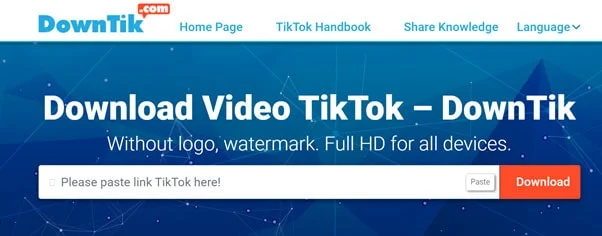
1. DownTik.com

DownTik.com – A multi-platform free online TikTok video download site shared by many people today.

DownTik fully meets all user requirements, allowing you to download Tiktok videos of many different formats and qualities without watermarks, logos.
 
It is suitable for those who specialize in video editing or sharing on other social networks.

Step 1: Open TikTok, click on the video and select "Copy link" at the Share icon.

Step 2: Click directly on the link: https://downtik.com/

Step 3: Paste the Tik Tok video link into "Please paste link TikTok here" and click "Download."

Step 4: Select Download Video without a logo at the tab Without Watermark. In case if you want to download with a watermark, select Download Video at the Watermark tab.
 
Downtik: easkme
 
The downloaded file is displayed in the lower-left corner of the interface; click directly on it or go to the "Download" folder and Open the downloaded file.

1. X2convert:

X2convert.com – A multi-platform free online TikTok video Download site shared by many people today.

X2convert fully meets all user requirements, allowing you to download Tiktok videos of many different formats and qualities without watermarks, logos.

It is suitable for those who specialize in video editing or sharing on other social networks.

Step 1: Open TikTok, click on the video and select "Copy link" at the Share icon.

Step 2: Click directly on the link: https://x2convert.com/vi99/tiktok-downloader

Step 3: Paste the Tiktok video link into "Copy and paste the link here" and click "Get Video Link."

X2convert TikTok Video Downloader: eAskme

Step 4: Select Download Video without a logo at the tab Without Watermark. In case if you want to download with a watermark, select Download Video at the Watermark tab.

The downloaded file is displayed in the lower-left corner of the interface; click directly on it or go to the "Download" folder and Open the downloaded file.

2. Ytop1:

This is a simple, easy-to-use, ad-free tool. Ytop1.com shows its superiority in supporting Tiktok video downloads.

You can use it on your phone, PC, and tablet without installing an app.

Step 1: Open the TikTok video, press the arrow icon and select "Copy link."

Step 2: Return to the main screen of your phone, open a new browser and visit the following link.

Ytop1 TikTok Video Downloader: eAskme

Step 3: Paste the Tiktok video link into "Copy and paste the link here" and click "Get Video Link."

Step 4: To download TikTok videos without a logo, select the option "Without Watermark". Select "Download" again to confirm the file download.

Step 5: At this point, Ytop1.com will download the file for you and display it below the interface, click on that file to open the Tiktok video.

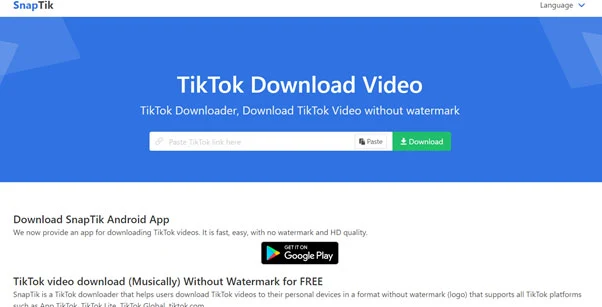
3. Snaptik:

This site supports downloading TikTok videos and Douyin videos (TikTok Chinese version).

Snaptik TikTok Video Downloader: eAskme

Step 1: You go to the homepage.

Step 2: Paste the TikTok video link into the empty box > press Enter.

Step 3: Then, you click Download Server (01 or 02) to download the video or share it on other social networks.

The downloaded video will be in MP4 format and without a Watermark.

4. Expertsphp:

This site allows you to download TikTok videos with and without Watermark.

Step 1: You go to the homepage.

Expertsphp TikTok Video Downloader: eAskme

Step 2: Paste the TikTok video link into the empty box > click Download.

Step 3: To download TikTok videos without a logo, select the option "Without Watermark." Select "Download" again to confirm the file download.

Besides TikTok, this site supports downloading videos and images on Pinterest.

5. TikTokDownload:

This site also allows you to download TikTok videos with and without Watermark.

Step 1: You go to the homepage.

TikTokDownload TikTok Video Downloader: eAskme

Step 2: Paste the TikTok video link into the empty box and press Enter.

Step 3: Click Download the type of video (with Watermark, without Watermark) you want to download.

The site also has a TikTok video downloader app for Android. You can access it from the home page.

6. TikTokVideosDownloader:

This site allows you to download TikTok videos and the cover image of the video.

Step 1: You go to the homepage.

Step 2: Paste the TikTok video link > press Enter.

TikTokVideosDownloader TikTok Video Downloader: eAskme

Step 3: Then you can download video (yes, without Watermark), video image, original video cover image, default video cover image.

Using Tik Tok Video Downloader can convert videos to MP3 audio files.

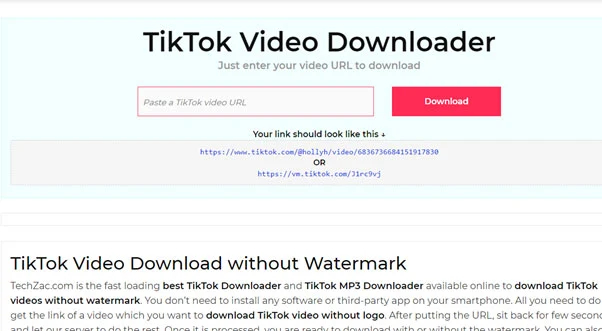
7. TikTok Video Downloader:

This is a dedicated service for you to download videos on TikTok, including the songs used in the video.

Service for free use, no account, unlimited downloads.

To download, do the following:

Step 1: Visit https://techzac.com/tiktok/> paste the video link in the empty box> click Download.
Step 2: Choose one of two options:

  • Download without Watermark
  • Download original

If you want to download the song used in the video, click Download music.

TikTok Video Downloader: eAskme


Conclusion:

By now, you've got some ideas for TikTok videos to download.

What are you waiting for?

Choose for yourself a suitable option to download TikTok videos right now.

Thank you for reading. Please share this article with your loved ones.

If you still have any question, feel free to ask me via comments.

Share it with your friends and family.

Don't forget to join the eAskme newsletter to stay tuned with us.

Other handpicked guides for you;

Read More

2021/10/19

How to Watch Google Pixel 6 Fall Launch Event?

Google Presents: Pixel Fall Launch Event Live

Google Pixel 6 Fall launch event is streaming now. You can watch the complete Pixel 6 launch event online for free on YouTube.

Google has already talked about the existence of Pixel 6 and Pixel 6 pro.

How to Watch Google Pixel 6 Fall Launch Event?: eAskme

This time the Google Pixel 6 will use Google’s CPU.

People who want to know every single detail about the Google Pixel 6 should watch this pre-recorded event.

When does Google Pixel 6 Event start?

Google Pixel 6 event has started online at 1 PM ET / 10 AM PT on 19th October 2021.

Where can I watch Google Pixel 6 Event?

Google Pixel 6 event is streaming for the public and press on the Pixel event page.

You can also watch the Pixel 6 event online on YouTube live.

Note: The Pixel 6 starting price is $599, and the Pixel 6 Pro starting price is $899, and they will be available in the market from Oct. 28.

Follow us at Facebook and Twitter for more.

If you still have any question, feel free to ask me via comments.

If you find this interesting, share it on Facebook, and Twitter.

Don't forget to Follow on Twitter to stay tuned with us.

Moe interesting content for You:

Read More

2020/12/13

Watch Top Emotionally Engaging Christmas Ads

Emotional content is what makes a video or article go viral. When it comes to video marketing, YouTube stands as the most powerful marketing platform for creating engaging ads. During holidays, brands are creating holiday video ads to attract more customers and improve SEO performance.

A recent study shows that the average work tenure of a chief marketing officer in US companies is 41 months.

Watch Top 20 Emotionally Engaging Christmas Ads: eAskme

Other people are at: Top YouTube Searches This Year (USA & Worldwide)

Most of the Chief-Marketing-Officers in American brands are working upto 30 months.

For Chief-Marketing-Officers who want to spend years, it is essential to analyze the emotional Christmas ads.

Online retailers should also focus on;

  • Why are other brands using emotional video marketing?
  • Why brands analyze Christmas ad content?

You can use emotional content to learn from the emotional video ads.

Here I am sharing the most emotionally engaging Christmas ads.

Not On The High Street’s The Magic of Small Things

M&S FOOD’s This is M&S Christmas Food

Aldi’s Christmas Launch Advert 2020

Lidl’s Big on a Christmas You Can Believe In

Asda’s That’s an Asda Price Christmas

Argos’s An Evening with AbracaDaisy & the Incredible Lucy

Hobbycraft’s Craft Together This Christmas

TK Maxx’s The Lil’ Goat

Deliverloo’s Christmas Is On!

Conclusion:

Emotionally engaging Christmas ads are the best examples of how content can trigger emotions and influence buyer's decision.

Watch them and let me know which ad you find most influential.

If you find this article interesting, don’t forget to share it with your friends and family.

Why?

Because, Sharing is Caring!

Don't forget to like us FB and join the eAskme newsletter to stay tuned with us.

You May Also Like these;

Read More

2020/11/10

How to Make a Video Collage

Whether it is a wedding, a birthday, or a party, taking a lot of photos is an integral part of all such events. The best way to consolidate these special pictures from prominent events is by turning them into a video collage.

Video collages are generally photo slideshows with background music.

They are a great way to keep a record of your memories from a special event.

How to Make a Video Collage: eAskme

Other people are at: 3 Reasons eHarmony Is Better Than Match

You can use such a video collage for even creating your modeling portfolio.

Also, they are a great way to show someone you care about them deeply.

No matter what your reason may be, learning how to make a video collage can be an effective skill that would help you out in more ways than one.

This article will help you learn this awesome skill With the help of a few essential pointers, and talk about popular platforms that can be used for making video collages effortlessly.

Select background music

Before you jump into making a video collage, you need to have a few things in place to ensure a seamless and hassle-free experience.

First and foremost, select a music track that would go well with the video collage you are making.

Pick something romantic if the video collage is for a special someone, or if it is for displaying the photos from an event like a wedding or an anniversary.

In similar fashion choose the track to fit the occasion or the theme.

Consolidate photos

Once you select an appropriate music track, you can then select the photos you wish to include in the video collage.

If the video collage is for a special occasion, try asking your family members or relatives if they have any pictures you can use in the video collage to make it even more special.

Ensure that you collect as many pictures as possible.

Once you start making the video collage you can let go of a few pictures and include the ones that seem appropriate or apt with the theme of the video collage.

Pick the video collage making software

These days, there are plenty of video collage making software available online. Here is a list curated just for you.

1. Image to Video

This is an excellent platform to combine as many photos as you want and turn them into a video collage.

This platform has several useful tools like the image to video maker, audio to video maker, slideshow maker, water effect creator, text to video converter, music addition, text addition, logo addition, 3D transition effect, and collage maker.

This platform can also be used to trim the video and audio if necessary.

2. Animoto

This is another platform which plenty of people rave about.

You can select a template and upload photos on this platform, after which the tools available here convert them automatically into wonderful video collages.

However, the tools on this platform are not free to use. The services that come with a free account are often limited in usefulness.

3. Adobe Spark

Adobe is a well-known brand popular for its superior editing tools. It is easy to learn and comes with some wonderful functionalities.

This software platform is pretty intuitive due to which even a novice user can use it without any prior technical knowledge in video collage making.

4. Any Video Editing

If you want to customize your video collage as per your desire, you can try out this software.

When you make a customized video collage using this software, it will take you slightly longer than using the other software mentioned above.

However, one good thing is that you would have complete control over your video collage when you use this software.

Making the video collage

A few steps of making a video collage may vary when it comes to different tools and software.

However, the basic steps remain the same.

Below are a few steps commonly used when you make a video collage using any of the available tools and software.

  • Step 1: Import all the photos required in the video collage.
  • Step 2: Arrange them in the sequence you wish for them to appear in the video collage.
  • Step 3: Add a little movement to the images by positioning and scaling the photos.
  • Step 4: Add a few special effects for the transitions from one photo to another.
  • Step 5: Import the music track you want and add it to the photo timeline created by you in the earlier steps.

Once you do this, you will have your video collage ready, with all the special moments blended perfectly into a short video clip.

Editing the video collage

Once you have made the video collage using any of the software and tools mentioned above, you can then fine-tune the resultant video using editing tools.

A few of the best editing tools which you can use for this purpose are:

  • Apple iMovie
  • Adobe Premiere Pro
  • DaVinci Resolve
  • Windows Movie Maker
  • FlexClip Video Maker

Once you are done with editing the few minor flaws in the video collage, find the right moment to show it and surprise your loved ones.

You can even share this video collage on social media platforms to show the video collage to your friends.

The above guide can be pretty useful if you are new to the world of video collage making.

With a little bit of practice, you can master the technique of making highly effective video collages for several different occasions.

If you still have any question, do share via comments.

If you find this article interesting, don’t forget to share it with your friends and family.

Why?

Because, Sharing is Caring!

You May Also like These;

Read More
Grow Instagram Audience